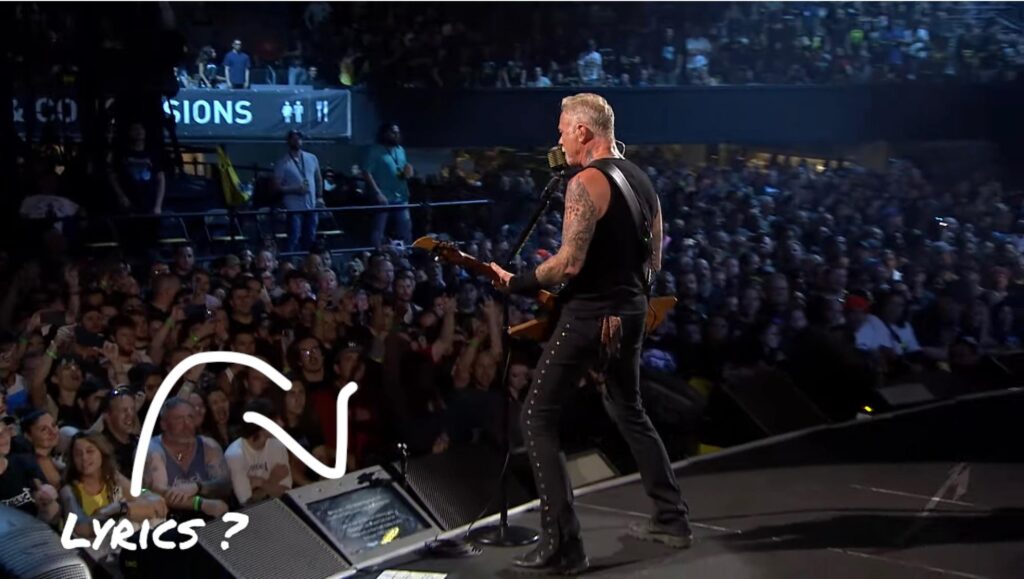

Whether you’re leading worship on Sunday morning or rehearsing with your praise band, the days of fumbling with paper chord charts are fading.
Over the past decade, iPad teleprompter apps and confidence monitors have transformed how musicians and worship leaders prepare for and deliver live performances. These tools turn an iPhone or iPad into a powerful teleprompter and chord chart system, helping worship leaders stay organized while focusing on leading and connecting with their congregation.
Modern solutions like BLACK BOX Prompter take this a step further by allowing performers to use teleprompter content without blocking their view of the audience, maintaining natural eye contact and stage presence during worship.

For church musicians and live performers, today’s teleprompter apps offer far more than simple lyric display. Leading iPad teleprompter apps now include chord charts, automatic scrolling, instant key changes, setlist management, and projection features—all in a portable device.
When combined with performance-focused hardware such as BLACK BOX Prompter, worship leaders can mirror their iPad on a larger display – and placed out of the way, reducing distractions, allowing them to lead confidently without looking down at screens or turning away from the congregation.
This comprehensive review explores the most popular iPad teleprompter apps for worship teams and church musicians, along with modern solutions that help integrate technology seamlessly into the worship experience.

OnSong
Since 2011, OnSong (a BLACK BOX Prompter partner) has established itself as the gold standard among iPhone teleprompter apps specifically designed for musicians and worship leaders. With 15 years of continuous development and widespread adoption in churches worldwide, OnSong has become synonymous with digital chord charts for worship teams. Churches from small community gatherings to major television broadcasts rely on OnSong for their musical performances.
Pros
- Seamless integration with BLACK BOX Prompter: Transfer OnSong library (songs and set lists)
- Seamless integration with CCLI SongSelect, Planning Center, WorshipReady.com, and Rocking With The Cross
- Instant key transposition with transpose slider—perfect for accommodating different vocalists
- OnSong Console web interface for managing your library from any computer
- Automatic scrolling or hands-free control via wireless foot pedals
- Built-in digital pitch pipe and metronome with click track
- Support for backing tracks that trigger automatically
- MIDI integration for stage automation and lighting control
- Lyrics projection to external displays via HDMI, AppleTV, or Google Cast
- Custom backgrounds with still images, motion graphics, or live video feeds
- Confidence monitors for band members
- Import from Dropbox, Google Drive, email, SongSelect, and direct web imports
- PDF support for sheet music
- ChordPro format support for text-based chord charts
- Scan paper charts directly and extract text using document scanner
- Share songs and sets instantly with other OnSong users
- ChordFlow PDF Transposition detects and transposes chords in PDF files
- Built-in tuner for instrument tuning
- Key Finder technology analyzes your voice to suggest optimal keys
- OnSong Charts service with professionally hand-scribed chord charts
- Drawing and annotation tools with Apple Pencil support
Cons
- Free version limited to viewing only 30 songs without editing capability
- Some users report the chord extraction and transposition occasionally requires manual editing
- Multiple app versions (OnSong 2020, OnSong 2026) have created some confusion for new users
- With so many advanced features, the learning curve can feel steep for less-computer savvy users
- Premium features like Console and MIDI require Premium subscription ($59.99/year)

OnSong Pricing
OnSong 2026 is free to download with limitations (30 songs, view-only). OnSong Essentials subscription: $3.99/month or $29.99/year. OnSong Premium subscription: $5.99/month or $59.99/year. Group subscriptions available starting at $1.33 per user/month when paid annually. Previous purchasers of OnSong 2020 (the paid version) can continue using that version with all pro-level features included.
What Customers Have to say
Reviews are overwhelmingly positive from working musicians. One professional musician stated, “I’m a working musician and find the OnSong app to be the greatest thing in my musical arsenal.” Another user who performs 9 hours of music weekly noted, “That means in order to do my job I’d have to have 9 hours of music with lyrics committed to memory. I can’t. OnSong makes my job possible.”
Worship leaders particularly appreciate the Planning Center and SongSelect integration. One church tech reviewer noted that OnSong “easily integrates with SongSelect, saves time by eliminating the need to make copies before rehearsals, and removes the management of those hard copies afterwards.”
Users consistently rate OnSong as the best option for worship teams: “This song learning app receives a very strong recommendation” and “OnSong is one of the best iPad apps that I’ve come across and is so useful.”
Bottom Line for Worship Leaders
OnSong is purpose-built for worship teams and represents the most comprehensive solution among iPhone teleprompter apps for church musicians. The SongSelect and Planning Center integration means worship leaders can import their setlists directly. The instant transposition feature is invaluable when accommodating guest vocalists or last-minute key changes. The projection capabilities allow the worship leader’s iPad to serve double-duty as both personal chord chart and congregation lyric source. For churches serious about going paperless, OnSong is the industry standard.
For more information on OnSong, visit onsongapp.com.
Planning Center Music Stand
Planning Center Music Stand is widely adopted among churches using Planning Center Services. Released in 2010 with the original iPad, Music Stand has integrated into thousands of worship teams’ workflows worldwide, from small congregations to large multi-site churches.
Music Stand is a pioneering digital music reading app. Version 4 (released in 2018, continuously updated) represents the current generation with regular updates improving annotations, zooming, and synchronization.
Pros
- Seamless integration with Planning Center Services—automatically syncs scheduled plans
- Direct import from SongSelect, PraiseCharts, MultiTracks, RehearsalPack
- Advanced annotation tools with Apple Pencil support
- Annotations stored online per user, can import from other keys/files/users
- View and merge team member annotations
- Hands-free page turning via Bluetooth foot pedals or MIDI devices
- Built-in metronome with auto-updating tempo and visual “flash” mode
- Integrated audio player with looping for practice
- Ableton Link syncs metronomes across devices
- Rearrange PDF pages to prevent awkward turns
- Instant pinch-to-zoom with per-user settings
- Two-page side-by-side landscape view
- Dark mode default (ideal for stage)
- Offline access to 10 most recent plans
- Edit lyrics and chords directly in app
Cons
- Requires Planning Center Services subscription plus Music Stand add-on
- Pricing scales with team size, expensive for larger teams
- Some users report sync issues (though recent updates improved this)
- Cannot be used standalone—requires active Planning Center Services account
- No chord transposition in Music Stand (must transpose in Planning Center Services)
- Two separate apps can feel disjointed
- Offline limited to 10 most recent plans

Music Stand Pricing
Music Stand is an add-on to Planning Center Services. You cannot subscribe to Music Stand alone—you must have an active Planning Center Services subscription first. Planning Center Services pricing starts at $14/month and scales based on the number of team members who access the system. Music Stand add-on pricing is tied to your Services plan level. A 30-day free trial is available with no credit card required. Once enabled for your church, every team member automatically has access by downloading the Music Stand app and logging in with their Planning Center credentials.
What Customers Have to Say
Users invested in Planning Center consistently praise Music Stand’s integration. One long-time user called it “a can’t live without tool” after 3+ years of use. Musicians appreciate eliminated paper copies and direct Planning Center setlist integration.
However, frustrations exist about pricing and two-app structure. One reviewer noted “using 2 apps in one can be a pain…it would be nice to have everything work together.” Song edit difficulties surface in reviews, particularly with key changes not updating properly. Annotation features receive strong praise, especially viewing team annotations and foot pedal support. Recent updates have resolved many sync issues.
Worship Team Suitability: Music Stand makes most sense for churches already using Planning Center Services. If heavily invested in the Planning Center ecosystem, Music Stand provides unmatched integration—setlists, songs, keys, and arrangements flow seamlessly without manual entry.
Bottom Line for Worship Leaders
The Services subscription requirement makes Music Stand among the more expensive iPhone teleprompter apps long-term. It excels at PDF display and annotation but lacks built-in chord transposition. Churches should evaluate whether Planning Center Services’ broader features justify the cost. If you need Services for scheduling and worship planning anyway, Music Stand is logical. If you only need digital sheet music, standalone options like OnSong or SongbookPro offer better value.
SongbookPro
SongbookPro has gained significant traction among worship teams and musicians who want a simpler, more affordable alternative to OnSong without sacrificing essential features. The app has cultivated a loyal user base who appreciate its straightforward approach and one-time purchase option. Church musicians specifically praise its reliability during live performances.
Continuously developed since its initial release, SongbookPro has focused on delivering core functionality that musicians actually need without unnecessary complexity. The developer maintains active responsiveness to user feedback and regularly releases updates improving reliability and features.
Pros
- One-time purchase model (approximately $6.99 USD)
- Clean, intuitive interface that’s easy to learn
- Full PDF support for sheet music alongside chord charts
- Instant key and capo transposition
- Import songs from ChordPro, OnSong, OpenSong formats, or PDF
- Direct import from Ultimate Guitar, WorshipTogether.com, and e-chords.com
- Setlist organization for easy song switching during performances
- Customizable display with adjustable fonts, colors, and background themes
- Black background with colored chords option reduces glare in darkened worship spaces
- Integrated metronome with tap-to-time and tempo memory per song
- Auto-scrolling at customizable speeds
- Handwritten notes directly on charts
- Bluetooth foot pedal support for all major brands
- Web interface for easier song editing from desktop computers
- Cross-platform synchronization (iOS, Android, Windows, Amazon Fire)
- Share songs and sets easily with other SongbookPro users
- MIDI support for keyboard players
- Backing track integration including Spotify tracks
- No ads or watermarks
- Highly responsive developer support
Cons
- Fewer advanced features than OnSong (no MIDI lighting control, no projection features)
- No direct Planning Center or SongSelect API integration
- Must purchase separately for different platforms (iOS purchase doesn’t transfer to Android)
- Auto-scroll timing during guitar solos sometimes gets ahead (workaround: manual scrolling or memorizing sections)
- Limited to 12 songs during free trial period

SongbookPro Pricing
Free trial limited to 12 songs.
Full version: one-time in-app purchase of approximately $6.99 USD (pricing varies slightly by region). SongbookPro Groups subscription available for worship teams who want shared library management and web-based editing platform.
What Customers Have to Say
Users consistently highlight the simplicity and reliability of SongbookPro. One church musician noted, “I’ve used other apps similar to this and SongbookPro does everything I need and more. Features are great, interface is easy and intuitive…I use my iPad for displaying my music while playing at church and need something that works reliably.”
Another user who has used the app for over a year stated, “I have been using SongbookPro for about a year and a half now…I have this synced with my 10 inch tablet I use for practice and performance. No more turning pages as it scrolls to whatever speed you want…This can be easily seen in a darkened room without glare when attached to the mic stand.”
The one-time purchase model receives particular praise: “And the best thing is it is a one time fee, so no recurring costs that go forever, and no ads either. This app is totally worth picking up.” Users report that after testing multiple iPhone teleprompter apps for musicians, SongbookPro provided the best balance of features and value.
A gigging musician shared: “I absolutely could not gig without this amazing app! It’s only a few bucks and worth way more!” The developer responsiveness also stands out, with one user noting they received a same-day response to a bug report.
Bottom Line for Worship Leaders
For worship teams on a budget or those who prefer owning software outright rather than subscribing, SongbookPro represents excellent value. It handles the essential tasks worship musicians need—displaying chords and lyrics, transposing keys, organizing setlists, and supporting foot pedals—without the complexity or ongoing costs of premium solutions.
The black background with colored chords is particularly well-suited for darkened worship environments. While it lacks OnSong’s projection and Planning Center integration, churches that primarily need personal chord chart displays will find SongbookPro more than adequate. The ability to import from WorshipTogether.com and Ultimate Guitar means building your worship library is straightforward.
The Right Tool for Your Worship Ministry
The landscape of iPad lyrics prompter apps for musicians and worship leaders has matured significantly, offering flexible solutions for teams of every size and style. For many ministries, the next step is not just having lyrics or notes available, but doing so in a way that preserves connection with the congregation.
Solutions like BLACK BOX Prompter represent this shift toward a more modern approach — allowing worship leaders to rely on the functionality of a lyrics prompter without losing eye contact or engagement with the congregation.
By mirroring an iPad to a BLACK BOX Prompter and positioning content naturally within the performer’s line of sight, you remove the visual barrier of your mobile device which enables you to lead with confidence, authenticity, and greater freedom on stage.
To learn more about how BLACK BOX Prompter can help your band or worship team deliver its best with fewer distractions or errors, visit blackboxprompter.com.